Job Tracker
The purpose of this screen is to get a summary view of the last run of all jobs across all apps running in Syntasa. This screen can be used to gain a quick understanding of the status of jobs that ran or an understanding of all the production jobs running for a particular app or module. Columns can be sorted and filtered. additionally, records can be downloaded using the DOWNLOAD button.
Job tracker can be accessed via Activity.
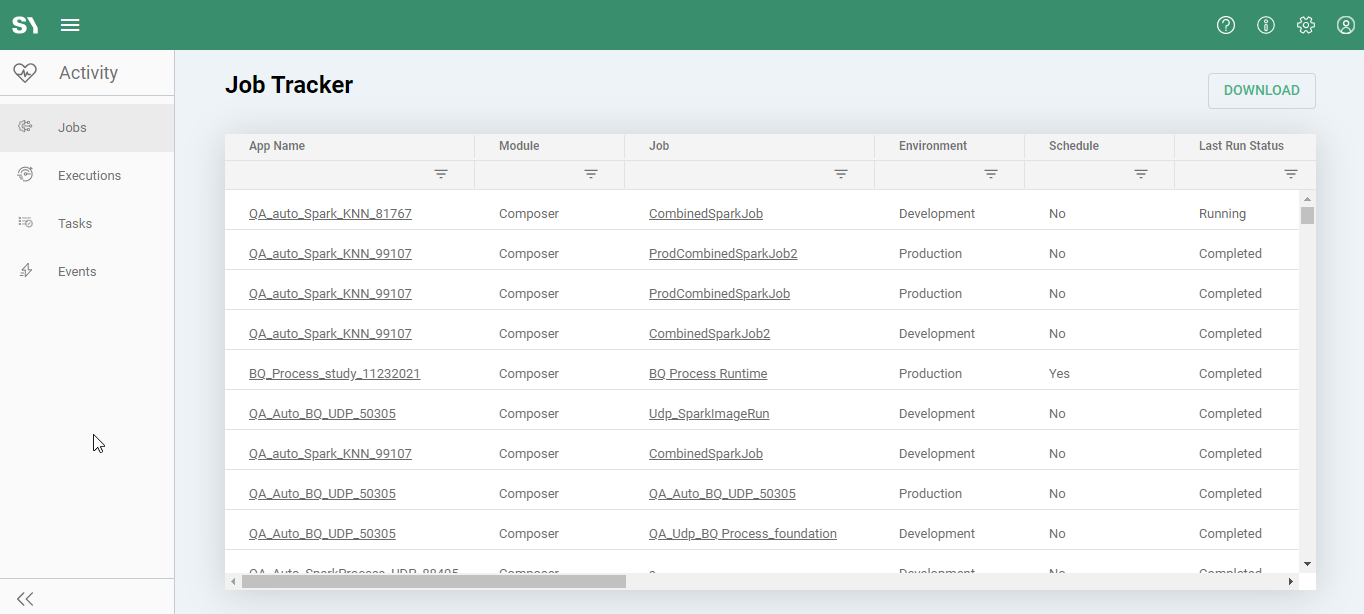
Note: You can side-scroll on Job Tracker, if you can't find a column it might be hidden by this.


Column Values
**App Name:**The name of the app. Selecting this will navigate to the app itself.
**Module:**The module the app is located in. Synthesizer/Orchestrator/Composer/Audiences.
**Job:**The actual name of the job. Selecting this will navigate to the job's activity logs.
**Environment:**Development or Production.
**Schedule:**Yes or No, depending on if the job is scheduled or not.
**Last Run Status:**Details on the status of the last run, will either be Completed/Aborted/Failed.
**Last Run Start Time:**Start time of the last run.
**Last Run End Time:**End time of the last run.
**Last Run Duration:**Duration of the last run
**Next Run:**This will be blank unless it's a production job that is running on a timed schedule.
Tags: User-defined tags were added to this job.
**Created By:**User who created this job.
**Created Date:**The date on which this app was created.
**Last Modified By:**Who modified the job last, most of the time this will correspond to either who executed the job, or who scheduled it.
**Last Modified Date:**When the job was last modified.