Customer Insights Agent: The Definitive Guide
Purpose
This document is the definitive guide for the Customer Insights Agent, covering basic usage, technical architecture, and administrative onboarding.
Learning Objectives
After reading this guide, you will be able to:
- Query Analytical Data: Formulate questions across seven levels of complexity, ranging from simple counts to multi-entity joins across disparate tables.
- Leverage Generative UI: Interpret human-readable Key Takeaways alongside automatically rendered visualizations (Line, Bar, or Map) tailored to the data's shape.
- Verify Logic and Lineage: Click Inspect (or the eye icon) to open the Traceability & Logic sidebar, allowing you to audit step-by-step reasoning logs, raw SQL code, and the specific schema columns used.
- Operationalize Audience Insights: Pin segments to dashboards, and Share results via internal links or external CSV/Image downloads.
Home & Navigation
Audience: Business Users & Analysts
The landing page serves as your starting point for instant data answers:
-
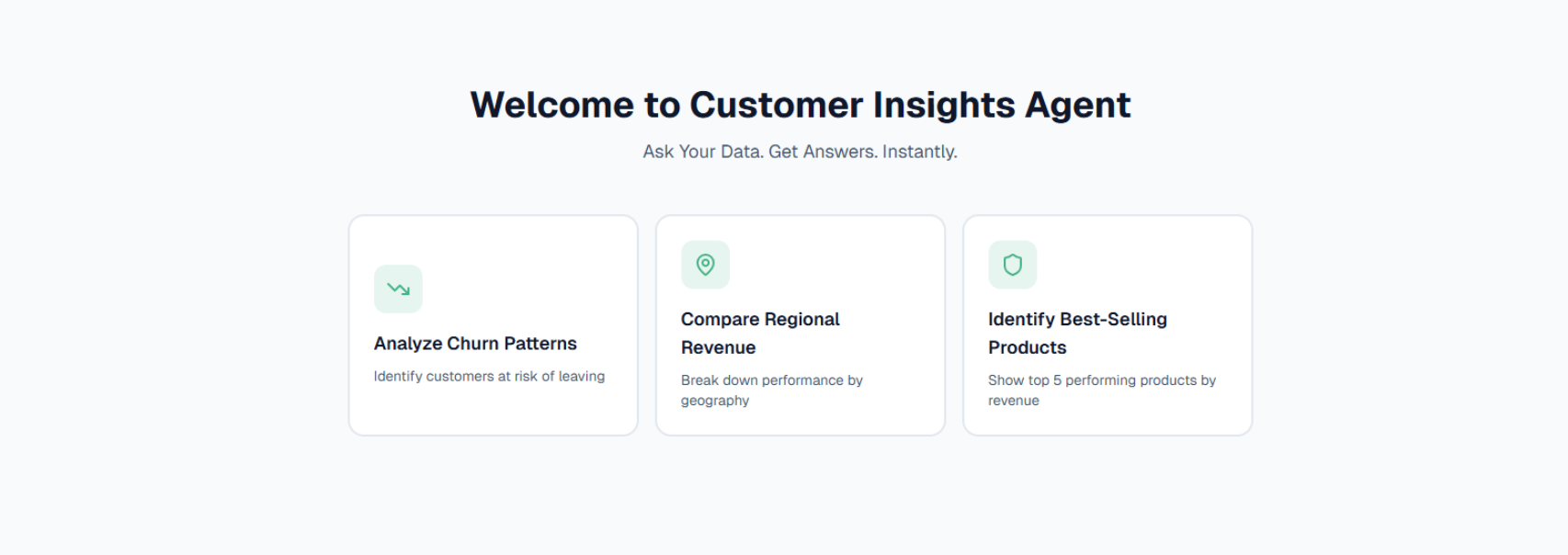
Quick Start Cards: Shortcuts for common analysis tasks: "Analyze Churn Patterns," "Compare Regional Revenue," and "Identify Best-Selling Products".
-
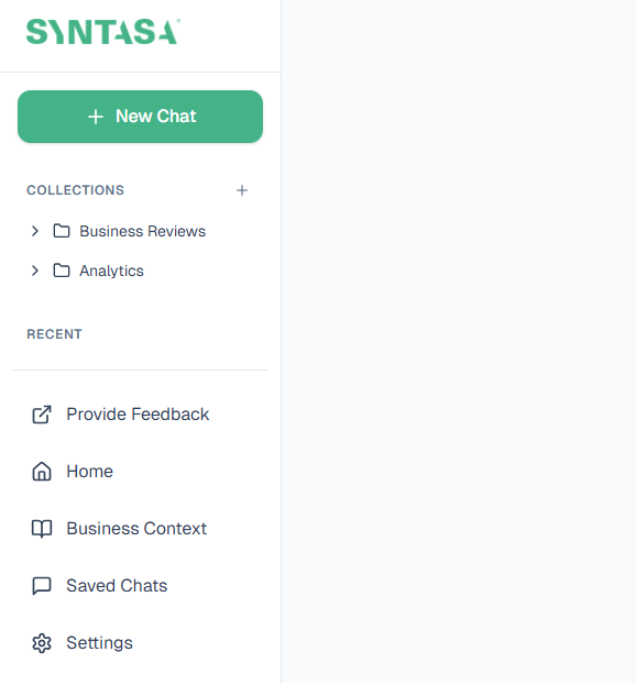
Navigation: Access Collections, Saved Chats, and the Business Context workspace via the sidebar
-
Accessibility: Use the Dark Mode Toggle in the bottom-left profile section to adjust visual contrast for late-night analysis
Conversational Intelligence: Asking Your Data
Audience: Analysts & IT Teams
- Validation Loop: If you enter an ambiguous term like "CVR," the agent pauses to ask: "Are you referring to conversion rate?".
Conversational Intelligence: Querying Your Data
The agent translates "business lingo" into database rules through an advanced input layer.

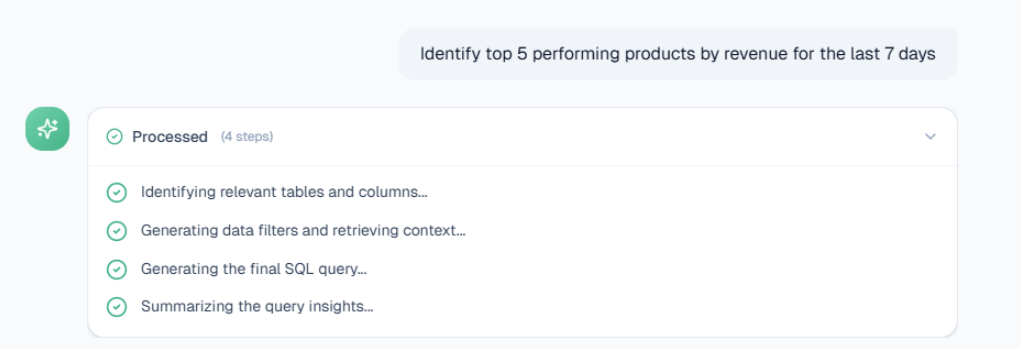
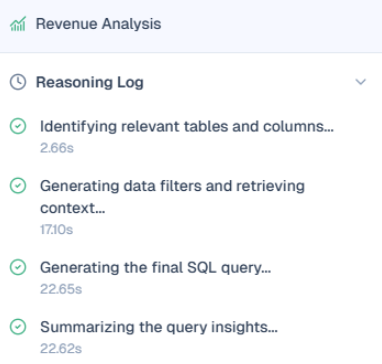
When a query is processed, the agent follows a 4-step execution chain (Identifying tables, Generating filters, Generating SQL, Summarizing insights).
-
Processing Log: Shows the step-by-step reasoning chain
-
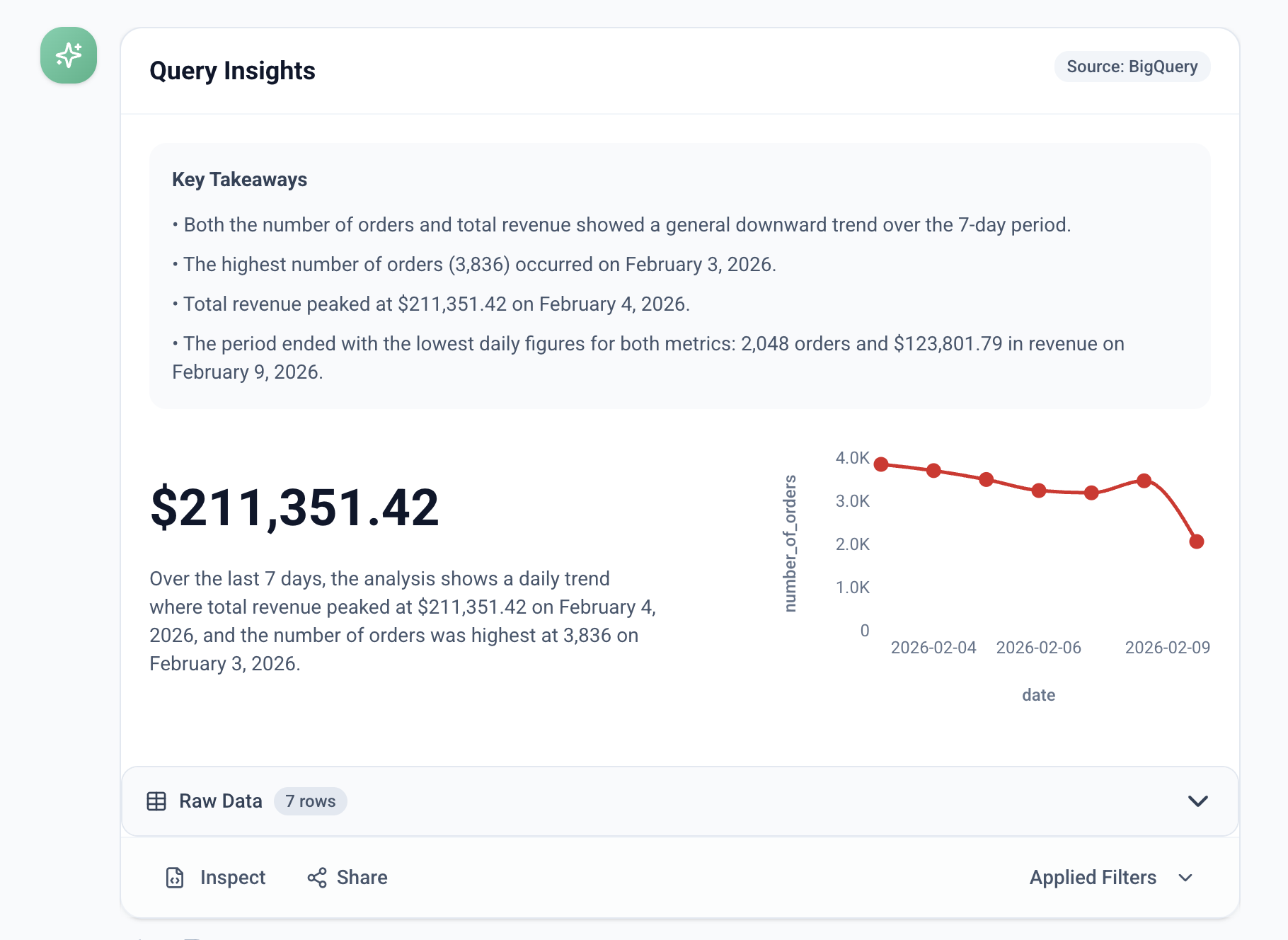
Query Insights: Human-readable bullet points summarizing the most important data trends.
-
Generative UI: Automatically renders the best visualization (Line, Bar, or Map) based on the data shape.
-
-
Action Footer:
-
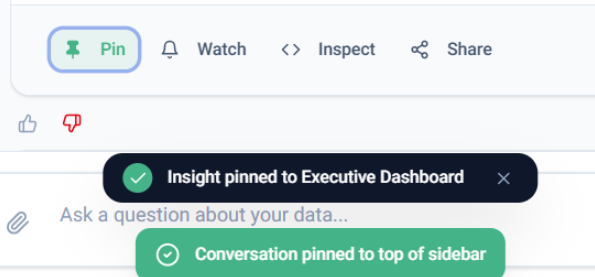
📌 Pin: Saves the insight to a Dashboard or pins the conversation to the top of the sidebar for weekly meetings.
-
-
Inspect: Opens the Traceability & Logic sidebar to provide full transparency into the reasoning steps, raw SQL code, and data lineage
-
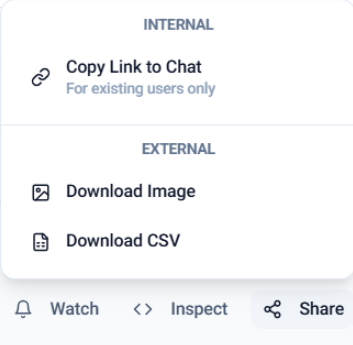
📤 Share: Supports Internal links for existing users and External downloads (Image or CSV).
-
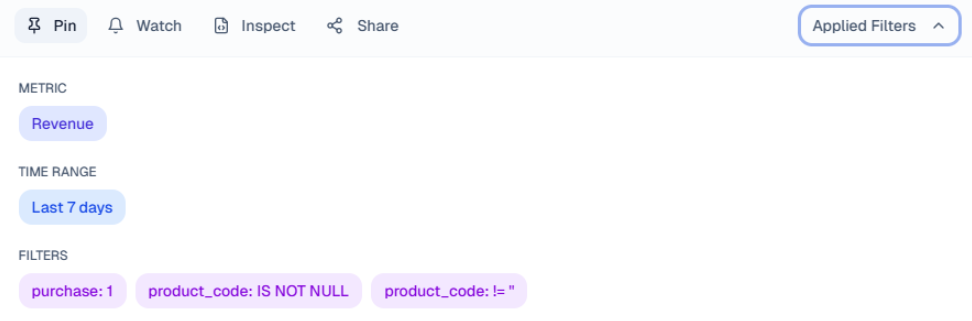
Applied Filters: A dedicated dropdown to review the specific Metric, Time Range, and Filters applied to the result.
Explainable Trust: Traceability & Logic
Audience: Analysts & Data/IT Teams
The Traceability & Logic sidebar (accessible via the Inspect button or the Eye Icon) provides total transparency for every generated insight.
Components of the Sidebar
-
Reasoning Log: A human-readable, step-by-step log showing the logic used and the time taken for each stage of the pipeline.
-
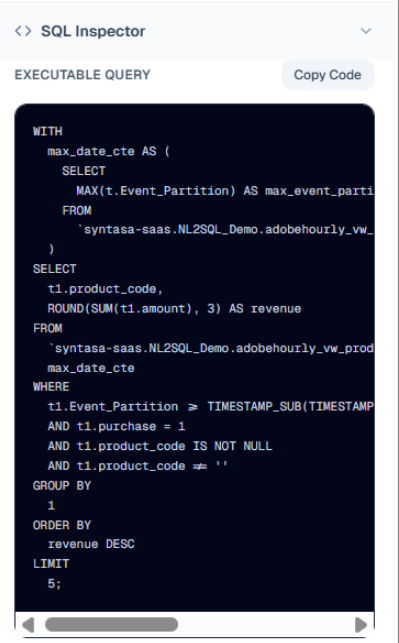
SQL Inspector: A read-only block containing the Executable Query. Users can verify the syntax or click Copy Code for use in other systems.
-
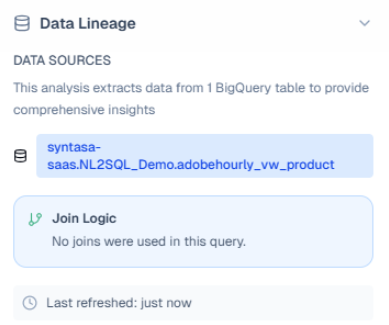
Data Lineage:
* Data Sources: Identifies exactly which tables provided the data.-
Join Logic: Explicitly states whether the analysis required joining multiple tables or was available in a single table.
-
Governance & Feedback
Audience: Admins & Developers
Feedback Loops (RLHF)
The agent captures granular feedback to fine-tune future responses:
-
Positive Feedback: Confirms the logic is correct and reinforces the pattern.
-
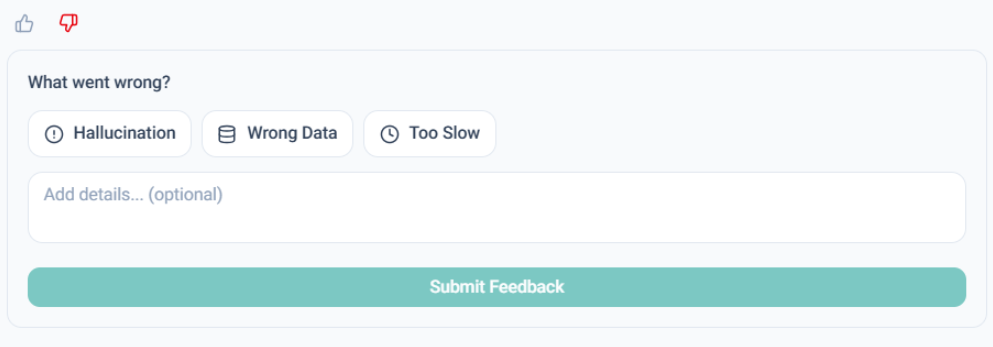
Negative Feedback: Users can flag specific errors like Hallucination, Wrong Data, or Too Slow, providing a description for system improvement.
Safety & Self-Correction
- Read-Only Safety: Strict backend enforcement ensures only
SELECTcommands are executed, blocking anyDROPorDELETEattempts. - Schema-Aware Generation: The agent performs a "dry-run" safety check. If the generated SQL fails against the schema, the agent silently corrects the syntax before displaying the result to the user.
- Data Hygiene Badges: The system flags results as "Low Quality" if they rely on columns with high null values or outliers.
Advanced Capabilities & Prompting
Purpose: Helping power users understand the limits and best practices for querying
Business Context
This feature allows organizations to define custom rules and business lingo so the AI doesn't have to "guess".
- Standardized Filtering: Define mandatory columns for date/time filtering (e.g.,
Event_Partition). - Default Logic: Set default time ranges (e.g., "Analyze the last 7 days if not specified").
- Custom Definitions: Define business-specific metrics, such as "High-Value Customer = purchase amount > $1000".
- Ranking Rules: Set default sorting and result limits (e.g., "Top 10 unless specified").
The 7 Query Groups
The agent supports a wide range of intents, categorized by their behind-the-scenes SQL complexity:
| Group | Intent | Example Question | SQL Logic |
|---|---|---|---|
| 1. Simple Counts | Quick status or totals. | “How many audiences are active?” | COUNT(*) |
| 2. Metadata Filters | Narrowing by attribute. | “Show me datasets using schema X.” | WHERE filters |
| 3. Aggregations | Grouping/summarizing. | “Count destinations by region.” | GROUP BY |
| 4. Sorting & Top-N | Finding top/latest items. | “Top 5 schemas by dataset count.” | ORDER BY... LIMIT N |
| 5. Conditional Logic | Adding computed flags. | “Mark journeys as ‘idle’ if inactive.” | CASE WHEN |
| 6. Temporal Queries | Analyzing over time. | “How many datasets per day this week?” | Date functions |
| 7. Multi-Entity Joins | Combining tables. | “Which datasets belong to activated audiences?” | JOIN logic |
Prompting Best Practices
- Plain English: Ask complete questions with clear entities (e.g., specific dates, dataset names, or audience types).
- Simplicity: Stick to one core concept per question to yield the cleanest SQL.
- Iteration: If a result isn't perfect, rephrase slightly—the agent learns patterns from structure.
- Entities to Try: Focus on core datasets currently supported, such as
vw_event(event-level data) andvw_product(product metadata).
Technical Architecture & Security
Purpose: Providing IT and InfoSec teams with the necessary system guardrails.
Data Security & Access
- Read-Only Model: The agent only reads data; it does not insert, update, or modify any tables.
- Least-Privilege: It operates under a service account restricted to SELECT access only.
- Privacy: Enterprise Vertex AI usage ensures that data passed to Gemini is never used for model training.
- Auditing: The tool captures submitted questions, final SQL, and result metadata for accuracy testing.
Internal Optimizations
- Schema Matching: Finds relevant tables by comparing the query to precomputed DDL embeddings.
- Similar SQL Lookup: Searches a library of "GoodSQL" examples to find similar structures or intents.
- Shortlisting: Gemini identifies specific columns for SELECT/JOIN and conditions for the WHERE clause .
- SQL Generation: Synthesizes and validates a complete, executable SQL statement.
Admin Onboarding & Accuracy Evaluation
Purpose: Assisting administrators in setup, testing, and troubleshooting.
Required Onboarding Inputs
- Access Credentials: Connection strings, API keys, or service account credentials.
- Table Inventory: A list of every table the agent should query.
- Schema Descriptions: Table and column purposes (can be auto-generated by Gemini if unavailable) .
- Sample NL-SQL Pairs: Verified "GoodSQL" examples to guide the agent's few-shot learning.
Accuracy Evaluation Metrics
The system automatically evaluates every query based on four key metrics:
- Column Match Rate: Did it pick the right fields?
- Filter Match Rate: Did it apply the correct conditions/filters?
- SQL Validity: Does the query semantically align with the ground truth?
- Final Score: The average of the above metrics representing overall accuracy.
Troubleshooting & Known Nuances
Tests have identified specific "formatting traps" to watch out for:
- Operator Mismatch: The model may use
BETWEENwhen the ground truth expects separate>=and<filters, which can lower the filter score despite being semantically correct. - Function Omissions: The model might miss necessary functions like
TIMESTAMP()in the filter value. - Quoting Discrepancies: Mismatches can occur if the model includes quotes around date strings while the ground truth does not.
- Refinement Strategy: Admins should update prompt templates with domain-specific terms or guardrails (e.g., safe query limits) to resolve these issues